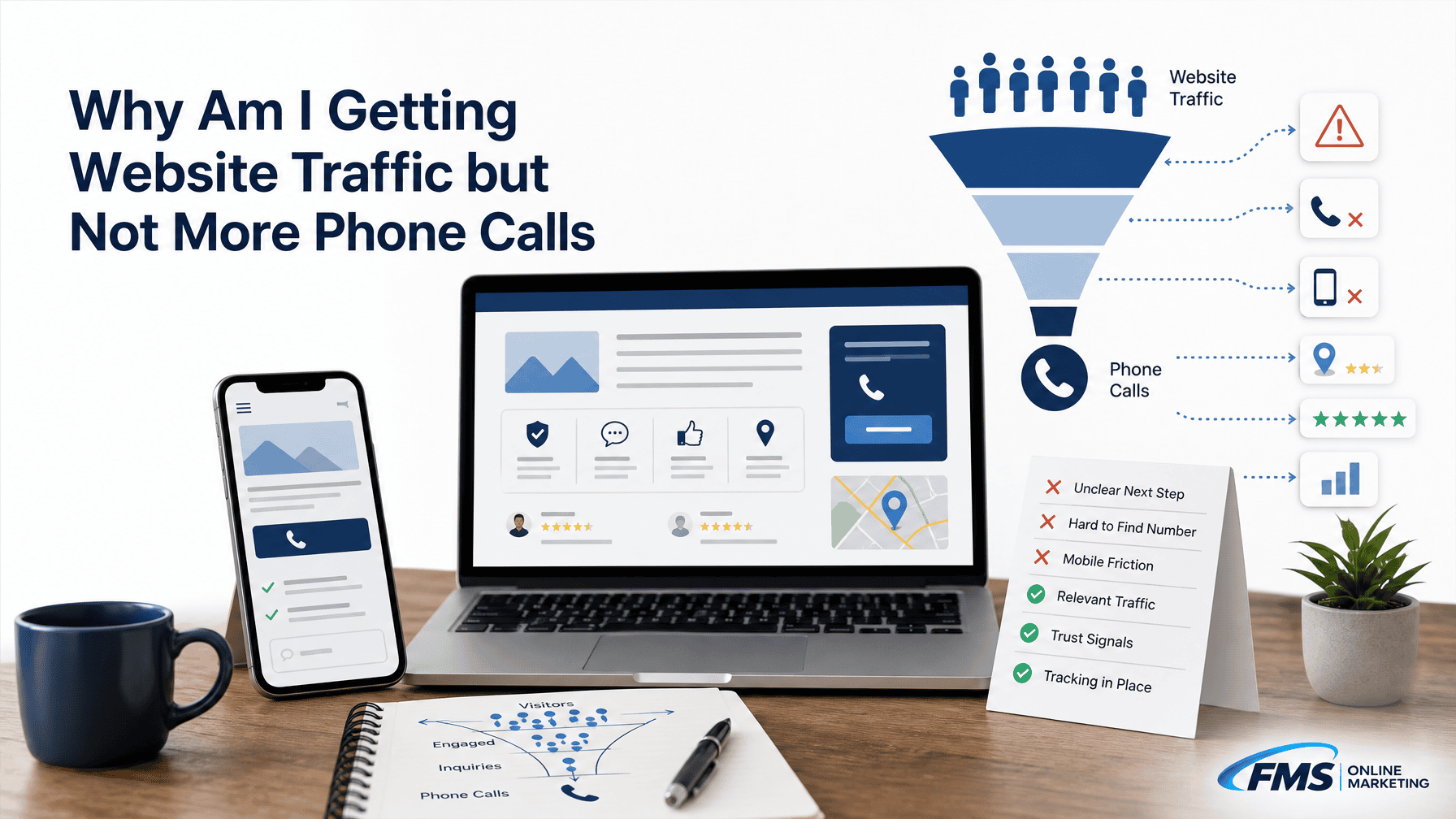
Website traffic does not automatically create phone calls. The most common causes are irrelevant or low-intent visitors, landing pages that do not match the search, a phone number or call-to-action that is difficult to use, weak trust signals, mobile friction, or calls that are happening but not being tracked. Start by comparing search queries and landing pages with phone clicks, actual call logs, and qualified leads before changing your SEO or redesigning the site.
Your analytics show sessions climbing week after week. The ranking reports look solid. But the phone sits quiet, and the inquiry form barely moves. If that gap feels familiar, you are not alone.
Here is the part that most traffic dashboards do not tell you: sessions, impressions, and rankings measure visibility. They do not measure buying intent or whether a real person picked up the phone and booked your service.
This guide will help you figure out whether the problem is traffic quality, page friction, trust, tracking, or something further down the intake process. Work through each layer in order before spending money on more traffic or a site redesign.
Website Traffic Does Not Always Lead to Phone Calls
Visibility, Visits, Inquiries, and Qualified Leads Are Different Events
These four stages look similar on a report but measure entirely different things. A business can rank well, pull thousands of sessions, and still generate almost no qualified inquiries if intent and page experience are misaligned.
Google Search Console records impressions and clicks, which reflect search visibility and pre-click behavior. Google Analytics tracks what visitors do after they arrive.
Google Business Profile reports profile actions such as call-button clicks and website clicks from the listing. According to Google’s Business Profile performance documentation, a “call” in the profile dashboard is the number of times a user clicked the call button on the listing, not necessarily a completed or answered call.

High traffic can coexist with low calls when intent is weak or the page does not create a clear next step. Treat these four stages as separate leaks to diagnose, not one combined metric to chase.
First, Confirm That Your Website Traffic Is Relevant
Are Visitors Searching for a Service or Just Information?
The first question to ask is whether your visitors actually want to hire someone or are simply researching. A roofing company ranking for “how long does a roof last” will attract curious homeowners, not necessarily people ready to call for an estimate. Pull your top queries in Google Search Console and check whether each one reflects a service intent or an informational one.
Using Search Console and Google Analytics data for SEO explains how the two tools complement each other: Search Console surfaces the pre-click query and page data, while Analytics reveals what happens after the click. Together they answer whether a visitor arrived expecting a service and whether the landing page matched that expectation.
Are They in the Areas You Actually Serve?
Geographic relevance is easy to overlook. Review the country and city breakdowns in Google Analytics and Search Console. If a meaningful share of sessions comes from outside your service area, those visits are unlikely to produce calls regardless of how good your page is.
Which Queries and Landing Pages Bring the Traffic?
Map your top landing pages to the queries driving them. A quick audit often reveals that most traffic enters through a blog post or the homepage rather than a service-specific page. Use the table below as a starting diagnostic.
| Query example | Landing page | Likely intent | Expected next action |
|---|---|---|---|
| “emergency plumber near me” | Service page | High, immediate | Call now |
| “how to unclog a drain” | Blog post | Informational | Read, possibly link to service |
| “HVAC company [city name]” | Homepage | Moderate, local | Browse, then call or contact |
| “roof repair cost” | Blog or FAQ | Research | Internal link to estimate page |
If the right intent is arriving at the wrong page, the fix is an internal link or a redirect, not more SEO spend.
Check Whether Visitors Can Find the Right Next Step

Is the Phone Number Visible and Tappable?
A phone number buried in the footer of a mobile page is effectively invisible. The number should appear in the header or a sticky bar, formatted as a live tap-to-call link. Test this on a real phone: tap the number and confirm it opens the dialer with the correct digits. According to data cited across multiple service-business audits, 77% of local searches happen on mobile devices, which means a non-tappable number costs you a large share of your best-intent visitors.
Does Each Important Page Have One Clear Primary CTA?
Every service page needs one dominant next step. When a page offers four competing options of equal visual weight, visitors hesitate and leave. Lead with the action that matches the visitor’s intent. On an emergency-service page, that is a prominent call button. On a detailed service description page, it might be a short form for a free estimate. Secondary options such as live chat or email can exist, but they should not compete visually with the primary CTA.
| Page element | Weak version | Stronger version | How to verify |
|---|---|---|---|
| Phone number | Footer only, plain text | Sticky header, tap-to-call link | Test on mobile device |
| Primary CTA | “Contact Us” button, mid-page | “Call for a Free Estimate” button, above the fold | Screenshot both views |
| Form | 10 required fields | Name, phone, service, submit | Count fields manually |
| Alternate contact | Not offered | Live chat or email below the fold | Confirm link works |
Are Forms, Booking Options, and Alternate Contact Methods Usable?
Forms with too many required fields create friction without adding qualification value. If a visitor has to enter their address, square footage, insurance provider, and three other fields before submitting a simple callback request, most will not finish. Trim forms to the minimum needed to respond meaningfully, then add detail during the call.
Could the Mobile Experience Be Blocking Calls?

Check Page Load, Layout Shifts, Pop-Ups, and Tap Targets
Google documents Core Web Vitals as measures of loading performance, responsiveness, and visual stability, and explains how they relate to search results. A page that loads slowly, shifts content while loading, or covers the phone number with a pop-up before the visitor can read it creates friction at exactly the wrong moment.
Check your key service pages in PageSpeed Insights and note the mobile score. Look for these specific issues: pop-ups that appear before the content loads, buttons smaller than 44 pixels that are hard to tap accurately, and layout shifts that move the call button just as a visitor reaches for it. Any one of these can break the call path on a real device.
Test the Full Call Path on a Real Phone
Desktop analytics reports rarely reveal mobile friction. Open your top service pages on a phone you have not configured as a test device, scroll through as a first-time visitor would, and try tapping the call button. Note how long the page takes to feel usable, whether anything covers the primary CTA, and whether the dialer opens with the correct number. This takes ten minutes and often surfaces the most obvious conversion blockers.
Build Trust Before Asking Visitors to Call
Show Service Details, Local Relevance, and Proof
A visitor deciding whether to call a service business is asking several quiet questions: Do they serve my area? Do they handle my specific problem? Are they reliable? Can I trust them with my home or business? The page needs to answer these before asking for the call.
Service pages should include a clear description of what the service covers, the areas served, realistic expectations about the process, and what happens after someone calls. Local relevance details such as neighborhoods served, city or ZIP coverage, and recognizable landmarks or reference points help a visitor confirm they are in the right place.
Use Reviews and Credentials Only When They Are Real and Verifiable
Online reviews are one of the most direct trust signals for local service businesses. Display them on the relevant service or location page, not only on a dedicated testimonials page that most visitors never find. Every review, credential, license, guarantee, and award shown on the site must be real and verifiable. Do not display invented testimonials, inflated review counts, or certifications that have lapsed. If the business has a Google rating or documented credentials, those are worth showing near the primary CTA where trust matters most.
Match Each Landing Page to a Specific Customer Need
Give Service Pages a Service-Specific CTA
A generic “Contact Us” CTA ignores the reason the visitor arrived. Someone landing on an HVAC tune-up page should see a CTA tied to scheduling that service, not a vague general inquiry form. Match the call to action to the service on the page and the intent behind the query that brought the visitor there.
Use Meaningful Location and Service-Area Pages
A location page that swaps only the city name while keeping all other content identical is unlikely to serve the visitor or rank well. A useful service-area page explains what the business does in that area, whether response times, local specifics, or coverage boundaries are relevant, and gives a clear next step. This approach supports both local SEO lead generation and a stronger conversion path for visitors who land on that page.
For businesses serving multiple markets, a Local SEO strategy that includes meaningful service-area pages is more likely to attract qualified, in-area traffic than a single homepage targeting a broad region.
Connect Informational Content to the Next Useful Action
Blog posts and educational articles attract informational traffic that is not yet ready to call. That does not make them useless. A well-placed internal link from a relevant article to the right service page moves a reader from research mode toward evaluation. The next step should match where the reader is in the decision process: a soft offer like “See how we handle this” works better on an educational post than a hard “Call Now” CTA that jumps ahead of the relationship.
How Can I Tell Whether the Problem Is Traffic Quality or Conversion Rate?
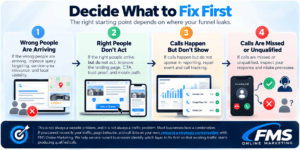
Before changing anything, map the actual leak using this four-branch diagnostic:

- Wrong audience arriving: Queries and landing pages show informational or out-of-area intent. Fix: improve targeting, service-area relevance, and local visibility through broader SEO services or content adjustments.
- Right audience arriving but not acting: Sessions from relevant queries land on matching service pages, but phone-click events and form submissions are low. Fix: inspect the page for CTA clarity, trust proof, and mobile friction.
- Calls happening but not appearing in reports: Phone-system logs show calls that Analytics or GBP does not account for. Fix: configure phone-click key events in Google Analytics and reconcile GBP call-button clicks with actual call records.
- Calls are missed or unqualified: Reporting shows calls, but few convert to booked jobs. Fix: inspect intake processes, response times, and call routing, not the website.
I would start with branch one or two before touching the site design. Most businesses fix the wrong layer because they skip the data check.
What Should I Track to Know Whether SEO Is Generating Phone Calls?
Google Search Console for Queries, Pages, Clicks, and Impressions
Search Console shows your pre-click performance: which queries triggered an impression, which pages earned clicks, what the CTR looked like, and how position changed over time. This is where you confirm whether the right searches are finding your pages.
Google Analytics for Sessions, Behavior, and Key Events
Google Analytics tracks on-site behavior and records key events, which Google defines as important actions collected in Analytics after an event is marked as a key event. Configure a phone-click event tied to your call link so you can see how many visitors tapped the number, which pages drove those taps, and what devices they used. Connecting Google Business Profile to Google Analytics allows you to see aggregated profile action data alongside site behavior, though individual-profile filtering has documented limitations.
Google Business Profile for Profile Actions
Your GBP dashboard reports website clicks, call-button clicks, direction requests, and messages. These are profile-level actions, and the call-button metric counts the tap, not the completed call. Use Google Business Profile optimization to keep the profile accurate, photo-rich, and review-supported so that profile actions reflect genuine interest.
Call Tracking, Call Logs, Qualified Calls, and Booked Outcomes
Reconciling all of these systems with your actual phone log is the only way to know whether SEO is producing real business outcomes. The table below separates the measurement layers.
| Metric | System | What it tells you | Key limitation |
|---|---|---|---|
| Impressions and clicks | Google Search Console | Pre-click search visibility | Does not confirm on-site behavior |
| Sessions and key events | Google Analytics | On-site behavior and phone-click events | Does not confirm the call connected |
| Call-button clicks | Google Business Profile | Profile-level tap intent | Counts the tap, not a completed call |
| Actual calls | Phone system or call tracking | Real call volume, duration, missed calls | Requires integration with other data |
| Qualified calls | CRM or intake record | Calls that matched service criteria | Requires manual or CRM classification |
| Booked outcomes | CRM or scheduling system | Revenue-linked results | Furthest from the marketing system |
Platform workflow references reviewed October 2026.
Common Reasons Local Businesses Get Traffic but Few Calls
| Symptom | Likely cause | What to check | First fix |
|---|---|---|---|
| High sessions, no phone events | Tracking not configured | Analytics phone-click key event | Set up and verify the event |
| Traffic from irrelevant queries | Weak search intent | Search Console query report | Align content to service intent |
| Traffic from outside service area | Geographic mismatch | Analytics location data | Add or strengthen service-area pages |
| Good traffic, right pages, no calls | CTA or trust gap | Mobile test, page review | Improve CTA placement and trust proof |
| Phone number buried in footer | Visibility problem | Mobile device check | Move to header with tap-to-call |
| Form submissions absent | Form friction | Count required fields | Reduce to minimum necessary fields |
| Mobile sessions convert poorly | Mobile experience | PageSpeed Insights, real device test | Fix load time, pop-ups, tap targets |
| Calls in logs not in reports | Tracking gap | Reconcile call log vs Analytics | Configure event or call tracking |
| Calls answered but not booked | Intake issue | Review call scripts and response time | Improve intake process |
| Reviews absent or hidden | Low trust | Service pages, GBP profile | Add real reviews near primary CTA |
Should I Improve SEO, Conversion Experience, or Both?
Google identifies relevance, distance, and prominence as the main local ranking factors. If searches relevant to your service are not finding you, more conversion work on a page that no one sees will not move the needle. On the other hand, if the right visitors are arriving and leaving without calling, more traffic will only multiply the same problem.
Use this prioritization framework:
- Improve SEO first when Search Console shows low impressions for relevant queries, when GBP visibility is thin, or when most traffic comes from outside your service area. A strong Local SEO strategy addresses relevance, service-area coverage, and local prominence before layering conversion fixes.
- Improve conversion experience first when relevant, in-area visitors arrive on the right pages but phone events are low. Fix the CTA, trust proof, mobile path, and form before buying more traffic.
- Work on both when visibility is weak, page intent is misaligned, and measurement is absent. This is the most common situation for businesses that have not audited either layer.
A Practical Action Plan for Generating More Website Calls
What to Check Today
- Open your top three service pages on a real mobile device and tap the phone number. Confirm it works and opens the dialer.
- Pull the top ten queries in Google Search Console. Note which ones reflect service intent and which are informational or out-of-area.
- Check whether Google Analytics has a phone-click key event configured. If not, that is a priority fix.
- Review your GBP call-button click data and compare it to your actual call log for the same period.
What to Improve in the Next 30 Days
- Rewrite CTAs on your top service pages to match the specific service and visitor intent on each page.
- Add or strengthen trust signals: real reviews near the CTA, accurate service descriptions, and visible service-area coverage.
- Fix the highest-friction mobile issues identified in your real-device test.
- Create or improve service-area pages for locations that drive qualified traffic but have thin or duplicate content.
- Configure phone-click events in Google Analytics so future decisions are based on real data.
What to Monitor Continuously
- Qualified calls and booked outcomes by source, landing page, and device.
- Missed calls and call duration as a signal of intake health.
- Page-level phone-click event rates compared to sessions by page.
- GBP call-button clicks versus actual call log counts.
- Local search rankings and impressions for service-intent queries.
Any stated improvement should be measured against the business’s own before-and-after data, not a generic benchmark.
Frequently Asked Questions About Website Traffic and Phone Calls
Can I get website traffic without getting phone calls?
Yes. Traffic often comes from low-intent searches, irrelevant locations, or pages that do not make the next step clear. High session counts do not indicate call readiness.
How do I know whether my website traffic is relevant?
Review queries, landing pages, locations, and service intent in Google Search Console and Google Analytics. Look for a mismatch between what visitors searched for and what the page offers.
Why are people visiting my website but not calling?
The cause may be weak intent, page mismatch, an unclear or hard-to-find CTA, low trust, mobile friction, or missing measurement. Start with a real mobile test and a Search Console query review.
Should my phone number be clickable on mobile?
Yes. Test that the visible number or call button opens the correct phone action on a real device. A plain-text number that does not trigger the dialer loses calls from mobile visitors.
What does Google Business Profile count as a call?
Google defines the metric as the number of times a customer clicked the call button on the profile, not necessarily a completed or qualified call. Do not treat that number as confirmed booked business.
What is the difference between Google Search Console and Google Analytics?
Search Console focuses on pre-click activity such as queries, impressions, and clicks. Analytics focuses on on-site behavior and key events after the visitor arrives. The two tools use different measurement systems and should be used together.
Do service pages help generate more calls than blog posts?
A service page is usually a more direct fit for a service-intent query. A blog post may need a relevant internal link and a softer next step to move the reader toward evaluation.
How do I track phone calls from SEO?
Reconcile Search Console queries and pages, Analytics phone-click key events, GBP call-button clicks, phone-system logs, and qualified outcomes. No single tool captures the full picture.
Should I improve SEO or conversion rate optimization first?
Fix the layer supported by your data. Improve traffic quality when the wrong people arrive. Improve conversion friction when the right people arrive but do not act.
Can FMS Online Marketing help if my traffic is not producing calls?
FMS Online Marketing publishes this guide and also provides Local SEO, Google Business Profile Optimization, and related search services. FMS offers local visibility, GBP strategy, service-page planning, and measurement support for service-based businesses. See local business success stories for examples, keeping in mind that individual results vary and should be reviewed on each case-study page.
Decide What to Fix First
The right starting point depends on where your funnel leaks.
1. If the wrong people are arriving, improve query targeting, service-area relevance, and local visibility.
2. If the right people arrive but do not act, improve the landing page, CTA, trust, proof, and mobile path.
3. If calls happen but do not appear in reporting, repair event and call tracking.
4. If calls are missed or unqualified, inspect your response and intake processes.
This is not always a website problem, and it is not always a traffic problem. Most businesses face a combination. If you cannot reconcile your traffic, page behavior, and call data on your own, request a strategy conversation with FMS Online Marketing. We help service-based businesses identify which layer to fix first so that existing traffic starts producing qualified calls.